Azure Virtual Desktop – 0x0 error on sign in
I came across this error then trying to sign in a user to AVD.
The configuration consists of hybrid joined session hosts, synced users from Active Directory to Entra ID, and SSO configured. In Active Directory, the required AzureADKerbereos object is also created.
but at generic error like 0x0 is very hard to troubleshoot on.
how to troubleshoot from Azure
One of the great things about AVD is that we can utilize Insights in Azure:
https://portal.azure.com/#view/Microsoft_Azure_WVD/WvdManagerMenuBlade/~/insights
Then go to “Connection Diagnostics”:

Scroll down to “ranking of errors”:
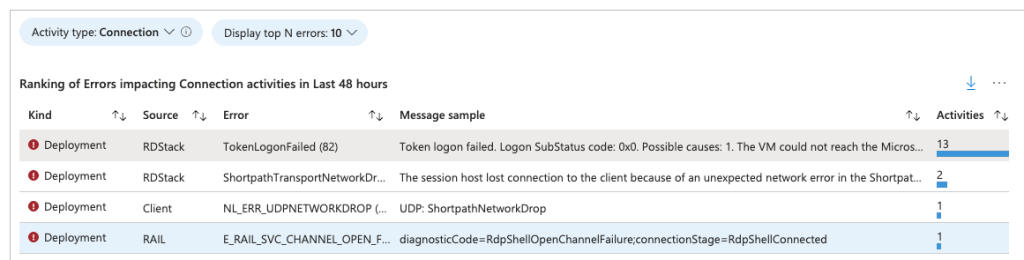
Here we can see the TokenLogonFailed and a message.
In my case, the user was member of Domain Admins and this will not work because:
The VM is hybrid-joined and Password Replication is disabled for the user on the ‘AzureADKerberos’ Domain Controller object
Only non-admin users are password replicated – users with admin roles from Active Directory will not have their password replicated to Entra ID and that causes the 0x0 authentication error.
Have feedback on this post?
Send me a message and I'll get back to you.
