
Azure Local – Pagefile eats up entire system drive
I came across a situation where I could not update an Azure Local stack because nodes where running out of diskspace.
I used WinDirStat from another management server (map one of the nodes C drive as a drive letter), because I did not know it was pagefile. But after a few minutes of chewing, I quickly saw it was very large pagefiles.
Pagefile is useful to an extend. But I wanted to control the max size. I searched and found several ways to configure using PowerShell, CMD/WMIC but ran into “out of range” issues with commands.
I use these commands in PowerShell to show current usage on C drive and how big pagefile is:
# Get diskspage usage
Get-WmiObject -Class Win32_LogicalDisk | ? {$_. DriveType -eq 3} | select DeviceID, {$_.Size /1GB}, {$_.FreeSpace /1GB}

# PowerShell
Get-WmiObject WIN32_Pagefile | Select-Object Name, InitialSize, MaximumSize, FileSize
I ended up using this from CMD:
wmic computersystem where name=”%computername%” set AutomaticManagedPagefile=False
wmic pagefileset where name=”C:\pagefile.sys” set InitialSize=12000,MaximumSize=32000
But on one node I had to use regedit (HKEY_LOCAL_MACHINE\SYSTEM\CurrentControlSet\Control\Session Manager\Memory Management), because the first command worked to disable automatic system controlled pagefile, but the second command to set the sizes failed.
Where I had to manually change the value “PagesFiles” to “C:\pagefile.sys 12000 32000”
I used PowerShell to do it:
Set-ItemProperty -Path "HKLM:\SYSTEM\CurrentControlSet\Control\Session Manager\Memory Management" -Name PagingFiles -Value "C:\pagefile.sys 4096 8192"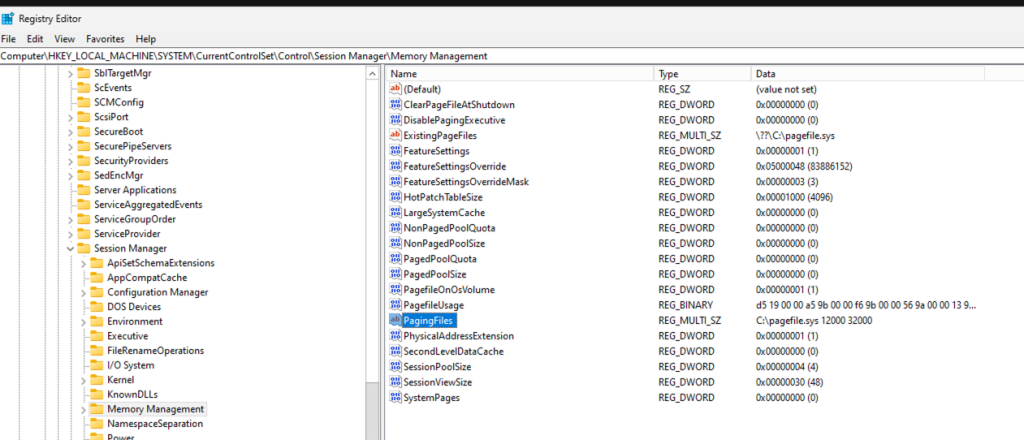
After reboot of all nodes, I had lots of free space and could resume update.
Have feedback on this post?
Send me a message and I'll get back to you.
