
Azure Local – Exception caught in Test-AzStackHciArcIntegration validator
- Intro
- The error
- How to fix it
- Missing ECE Store certificate for LCM User
- Missing permissions
- Wrong PowerShell Modules
- Need to specify default subscription ID in AzConfig
Intro
Below are a few different steps I have got from working with Microsoft Support while we did several troubleshooting sessions on an Azure Local Stack that could not update from 2507 to 2510 (25398 OS level).
The error
Error from “Get-SolutionUpdate” Health Results:
Title : Environment Validator Exception
Status : ERROR
Severity : CRITICAL
Description : Exception caught in Test-AzStackHciArcIntegration validator.
Remediation : Raise case with Microsoft support
And that is not much to go with. Luckily we can grab some more detailed infos here: (Replace NODE1 with name of your first node in your stack, and 11.2509.1001.21 with the version you are trying to update to)
\\NODE1\c$\ClusterStorage\Infrastructure_1\Shares\SU1_Infrastructure_1\Updates\HealthCheck\Solution11.2509.1001.21
It is also worth looking into this similar folder: \\NODE1\c$\ClusterStorage\Infrastructure_1\Shares\SU1_Infrastructure_1\Updates\HealthCheck\System
Open the latest .JSON files from that folder and you will find the complete error:
The error details:
[
    {
        "Name":  "Environment Validator Exception",
        "DisplayName":  "Environment Validator Exception - Test-AzStackHciArcIntegration",
        "Tags":  {

                 },
        "Title":  "Environment Validator Exception",
        "Status":  2,
        "Severity":  2,
        "Description":  "Exception caught in Test-AzStackHciArcIntegration validator.",
        "Remediation":  "Raise case with Microsoft support",
        "TargetResourceID":  "Test-AzStackHciArcIntegration",
        "TargetResourceName":  "Test-AzStackHciArcIntegration",
        "TargetResourceType":  "Environment Validator",
        "Timestamp":  "\/Date(1761464429497)\/",
        "AdditionalData":  {
                               "Detail":  "Exception occurred (Test-AzStackHciArcIntegration): The provided account MSI@50342 does not have access to subscription ID \"\". Please try logging in with different credentials or a different subscription ID. If a subscription is not specified, please check the configs by `Get-AzConfig`."
                           },
        "HealthCheckSource":  "PreUpdate\\Standard\\Medium\\ValidatedRecipe\\8eebab5d"
    }
]
How to fix it
Missing ECE Store certificate for LCM User
Common issue then password for LCMUser has been updated outside of the Azure Local Stack with the proper commands. Follow the mitigation steps from this GitHub Article:
Missing permissions
Go toAzure Portal and complete the following:
- Select Azure subscription for the Azure Local Stack
- Select ‘Access Control (IAM)’
- Select ‘Add Role Assignment’
- Select ‘Azure Stack HCI Device Management Role’
- Select ‘Managed Identity’
- Select ‘Select Members’
- Select ‘Machine – Azure Arc ()’ under Managed Identity
- Enter machine name “”
- Select all machines “”
- Assignment Type = “Permanent”
- Select “Review and assign”
- Repeat step 5 to 11 to assign “Azure Stack HCI Connected InfraVMs” on the nodes of the cluster.
Also make sure the other default required permissions are set: https://learn.microsoft.com/en-us/azure/azure-local/deploy/deployment-arc-register-server-permissions?view=azloc-2509
Wrong PowerShell Modules
There are some problems with certain versions of PowerShell modules. For the update to 2509 some limitions exist:
- Az.Accounts must be version 4.0.2
- uninstall-Module Az.Accounts -allversions
- install-Module Az.Accounts -RequiredVersion 4.0.2
- Az.Resources must be version 7.8.0
- uninstall-Module Az.Resources -allversions
- install-Module Az.Resources -RequiredVersion 7.8.0
Need to specify default subscription ID in AzConfig
In newer versions of Azure Local, Microsoft has adjusted for the updated behavior in Az.Accounts version 5 and above, there default subscription context is needed on login to Azure.
To check if the value is set, use the command Get-AzConfig.
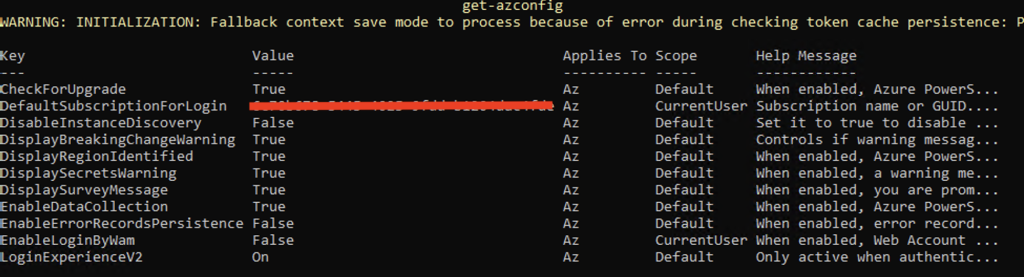
To set the default subscription, use the following command (you must be logged on to the nodes with the LCMUser account). Check with Get-Azconfig on all nodes to ensure the property is readable from all nodes.
Set-AzConfig -DefaultSubscriptionForLogin "" -Scope "CurrentUser"Have feedback on this post?
Send me a message and I'll get back to you.
