Azure Local – create alert rules using code (IaC)
This article is part of a series: Navigate to series page
If you want to deploy any alert rules to multiple Azure Local Stacks, it is very time consuming because you would have to create the same alert rules for each Azure Local Stack. But using Infrastructure as Code, it is possible to overcome this.
This guide is not a complete deployment of all recommended alert rules, but if you follow the principles and use the deployment logic, you can generate the alert rules you want and then use to deploy to all other Azure Local stacks in your tenant.
The deployment does not check for any existing alert rules already created for the Azure Local Stack, so you may need to add simple logic to exclude certain alert rules for mass deployment.
How to create rules from the portal
To create alert rules in the portal (to later export), navigate to the Azure Local instance and then Alerts:
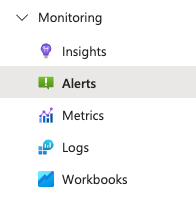
You can select “Set up recommended alerts”. This will generate alert rules. Then select “Alert rules” to view existing rules.
Select one of the rules in the list. Then on that alert rule, navigate to “Export template” and export in bicep template format.
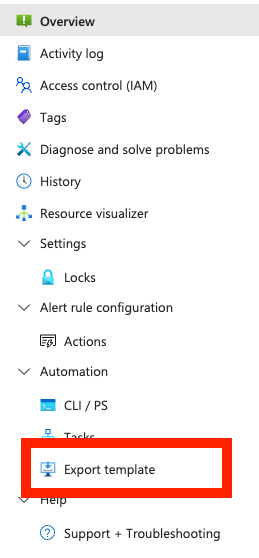
You will need to edit the params (look at the file I have shown above), so that no needed param is hardcoded – we need to be able to pass inputs to the params. Then save the .bicep template to the folder with your desired alert rules.
Alert rule bicep template
Below is a default bicep template to deploy a “storage degraded” metrics alert rule. Save this as .bicep file. Be aware that no action group is defined, you would normally need to add action group actions (mail, webhook e.g.)
param metricAlerts_Storage_degraded_name string = 'Storage degraded'
param clusterExternalId string
param location string

resource metricAlerts_Storage_degraded_name_resource 'microsoft.insights/metricAlerts@2018-03-01' = {
  name: metricAlerts_Storage_degraded_name
  location: 'global'
  properties: {
    severity: 3
    enabled: true
    scopes: [
      clusterExternalId
    ]
    evaluationFrequency: 'PT5M'
    windowSize: 'PT5M'
    criteria: {
      allOf: [
        {
          threshold: json('0')
          name: 'Metric1'
          metricNamespace: 'microsoft.azurestackhci/clusters'
          metricName: 'Cluster Node Storage Degraded'
          operator: 'GreaterThan'
          timeAggregation: 'Total'
          criterionType: 'StaticThresholdCriterion'
        }
      ]
      'odata.type': 'Microsoft.Azure.Monitor.MultipleResourceMultipleMetricCriteria'
    }
    autoMitigate: true
    targetResourceType: 'microsoft.azurestackhci/clusters'
    targetResourceRegion: location
    actions: []
  }
}
Deployment script
This script is designed to get all bicep files from a certain location, and deploy to all subscriptions with Azure Local stacks that the user signed in with, has access to
Connect-AzAccount

<#

Required PowerShell modules:
- Az.Accounts

#>

# Define folder path where your bicep templates for Azure Local alert rules exists
$folderPath = "/alertrules/"

# Get all alert rules in folder and deploy
Get-ChildItem -Path $folderPath -File -Recurse | ForEach-Object {
    if($_.FullName.split(".")[-1] -eq "bicep")
    {
        $alertRules += $_.FullName
    }
}

# Get all subscriptions - we will try to deploy to all Azure Local clusters in all available subscriptions

$allSubscriptions = Get-AzSubscription

foreach ($sub in $allSubscriptions)
{
    # Get all Azure Local clusters in subscription
    $allAzureLocalClusters = Get-AzResource -ResourceType "Microsoft.AzureStackHCI/clusters" | Select-Object Name, ResourceGroupName, Location, ResourceId

    foreach ($cluster in $allAzureLocalClusters)
    {
        $subscriptionId = $sub.Id
        $resourceGroup = $cluster.ResourceGroupName
        $clusterName = $cluster.Name
        $location = $cluster.Location
        $clusterExternalId = "/subscriptions/$subscriptionId/resourceGroups/$resourceGroup/providers/microsoft.azurestackhci/clusters/$clusterName"

        foreach ($alertRule in $alertRules)
        {
            New-AzResourceGroupDeployment `
            -ResourceGroupName $resourceGroup `
            -TemplateFile $alertRule `
            -Location $location `
            -clusterExternalId $clusterExternalId
        }
    }
}
Have feedback on this post?
Send me a message and I'll get back to you.
