Azure Local – AzStackHci Environment Checker
This is just a very small article about some cool things about the environment checker for Azure Local. I have used it multiple times for troubleshooting scenarios, that did not involve deployment (this tool is mainly for validation in the deployment phase).
Microsoft Learn article about this tool: https://learn.microsoft.com/en-us/azure/azure-local/manage/use-environment-checker?view=azloc-2510&tabs=connectivity
If you get errors on pre-update health checks, I have written another article about how to troubleshoot further then the Azure Portal and PowerShell commands for update status does not provide us with detailed error descriptions. You can find this article here:
/blog/wp/azure-local-exception-caught-in-test-azstackhciarcintegration-validator/
The module file is located here on nodes in the stack:
“\\nodename\c$\Program Files\WindowsPowerShell\Modules\AzStackHci.EnvironmentChecker\AzStackHci.EnvironmentChecker.psd1”
If we open this file, we can see a list of functions that are exported:
    FunctionsToExport = @(
        'Invoke-AzStackHciConnectivityValidation',
        'Invoke-AzStackHciExternalActiveDirectoryValidation',
        'Install-ActiveDirectoryModule',
        'Install-GroupPolicyModule',
        'Invoke-AzStackHciHardwareValidation',
        'Invoke-AzStackHciSBEHealthValidation',
        'Invoke-AzStackHciPortValidation',
        'Invoke-AzStackHciHostTCPMetricsValidation'
        'Invoke-AzStackHciLLDPValidation',
        'Invoke-AzStackHciNetworkValidation',
        'Invoke-AzStackHciClusterWitnessValidation',
        'Invoke-AzStackHciStorageValidation',
        'Invoke-AzStackHciObservabilityValidation',
        'Invoke-AzStackHciMOCStackValidation',
	'Invoke-AzStackHciSoftwareValidation',
        'Invoke-AzStackHciOSImageRecipeValidation',
        'Invoke-AzStackHciBootstrapValidation',
        'Invoke-AzStackHciBootstrapHardwarePrerequisitesValidation',
        'Invoke-AzStackHciUpgradeValidation',
        'Invoke-EnvironmentValidator',
        'Get-EnvironmentValidatorActionPlan',
        'Get-AzStackHciEnvironmentCheckerProgress',
        'Invoke-AzStackHciAddNodeValidation',
        'Invoke-AzStackHciArcIntegrationValidation',
        'Get-TestListByFunction',
        'Get-SslCertificateChain',
        'Enable-AzStackHciRemoteSupport',
        'Disable-AzStackHciRemoteSupport',
        'Get-AzStackHciRemoteSupportAccess',
        'Get-AzStackHciRemoteSupportSessionHistory',
        'Remove-AzStackHciRemoteSupport',
        'Invoke-AzStackHciBitlockerValidation',
        'Send-AzStackHciDiagnosticData',
        'Invoke-AzStackHciClusterValidation',
        'Invoke-AzStackHciValidatedRecipeValidation',
        'Invoke-AzStackHciLocalIdentityValidation',
        'Invoke-AzStackHciARBStackValidation',
        'Invoke-AzStackHciDNSValidation',
        'Invoke-AzStackHciCloudValidation'
    )
Run this command to import all functions from the module: Import-Module AzStackHci.EnvironmentChecker
The tool is divided into 5 categories:
- Connectivity
- Hardware
- Active Directory
- Network
- Arc Integration
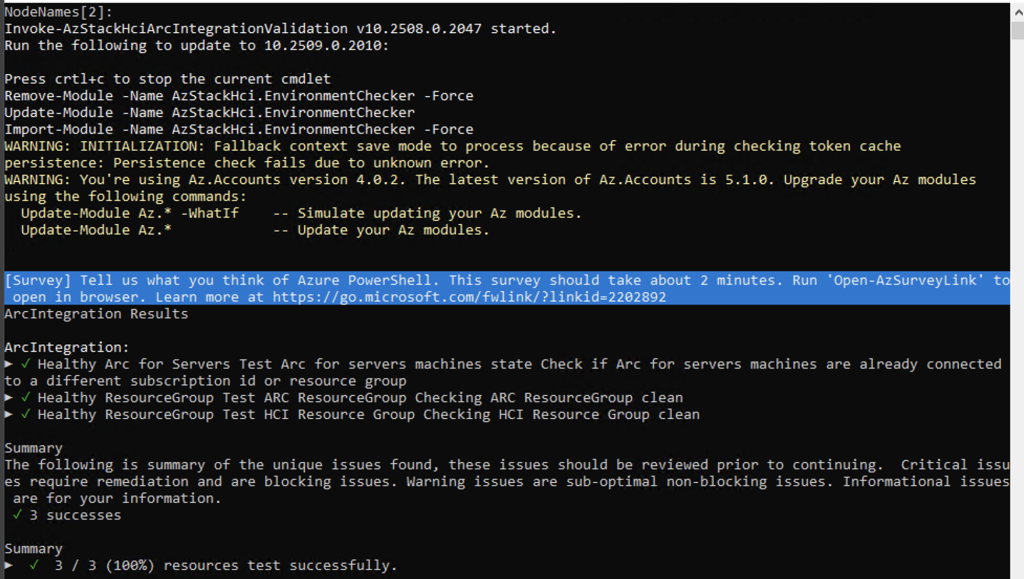
But if you want to only run a single test, you can actually call one of the functions like this and get the output to the console: Invoke-AzStackHciArcIntegrationValidation
Have feedback on this post?
Send me a message and I'll get back to you.
