
Azure Local - WDAC - Part 4 - Identify blocked applications and events in audit mode
- Intro
- Why audit mode matters
- Switch to audit mode and reproduce the scenario
- Collect WDAC-related events
- Correlate block events with signature details
- Extract useful fields for analysis
- Decide allow strategy: publisher first, hash when needed
- Validate and return to enforced mode
- Final remark
Intro
This article is part of a series: Navigate to series page
In the previous articles, I covered vendor policies, custom supplemental policies, and safe versioning. In this part I focus on the operational part most teams struggle with: identifying what WDAC is actually blocking (or would block) so we can create the right allow rules.
The key is to use Audit mode first, collect the right events, and only then move back to Enforced mode.
Why audit mode matters
If we troubleshoot directly in enforced mode, binaries can be blocked before we collect enough evidence. Audit mode gives us the same policy evaluation, but without stopping the process.
That lets us answer:
- Which executable or DLL triggered WDAC?
- Which signer, path, or hash should we allow?
- Is the event tied to software we actually approve?
Switch to audit mode and reproduce the scenario
Start by confirming current mode:
Get-AsWdacPolicyModeIf needed, switch to audit:
Enable-AsWdacPolicy -Mode AuditNow run the application, installer, update flow, or operational task you want to validate.
Collect WDAC-related events
The main source is Microsoft-Windows-CodeIntegrity/Operational.
This example pulls recent Code Integrity events commonly used during WDAC troubleshooting:
$start = (Get-Date).AddHours(-2)

Get-WinEvent -FilterHashtable @{
    LogName   = 'Microsoft-Windows-CodeIntegrity/Operational'
    StartTime = $start
    Id        = 3076,3077,3089
} | Sort-Object TimeCreated | Select-Object TimeCreated, Id, LevelDisplayName, Message
HINT Event IDs can vary by scenario and platform version. Use this filter as a practical start, then expand if your workload needs it.
In practice,
3077is the key signal for “would be blocked in enforced mode”, while3089adds signature details for correlated events.
Correlate block events with signature details
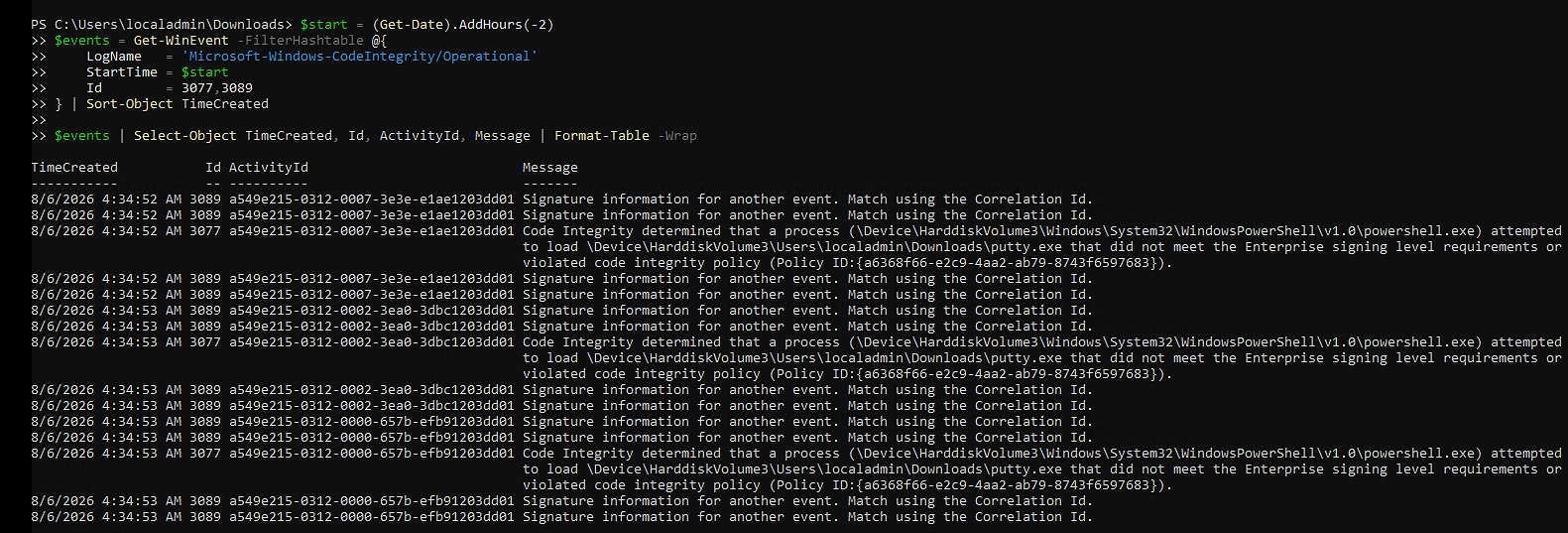
When multiple events are generated at the same time, correlate 3077 and 3089 by ActivityId:
$start = (Get-Date).AddHours(-2)
$events = Get-WinEvent -FilterHashtable @{
    LogName   = 'Microsoft-Windows-CodeIntegrity/Operational'
    StartTime = $start
    Id        = 3077,3089
} | Sort-Object TimeCreated

$events | Select-Object TimeCreated, Id, ActivityId, Message | Format-Table -Wrap
This makes it easier to tie the block event to signer information before deciding on publisher or hash rules.
Extract useful fields for analysis
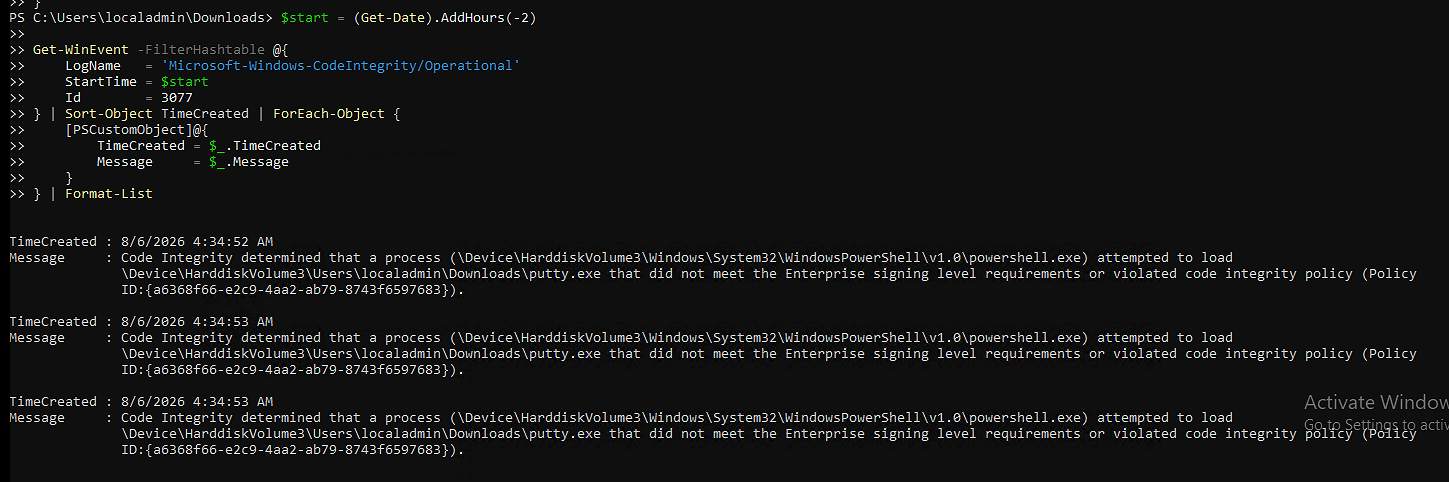
Use the event message from 3077 as the primary source for blocked file and policy details:
$start = (Get-Date).AddHours(-2)

Get-WinEvent -FilterHashtable @{
    LogName   = 'Microsoft-Windows-CodeIntegrity/Operational'
    StartTime = $start
    Id        = 3077
} | Sort-Object TimeCreated | ForEach-Object {
    [PSCustomObject]@{
        TimeCreated = $_.TimeCreated
        Message     = $_.Message
    }
} | Format-List
HINT This command is intentionally simple and reliable. Start with
3077messages first, then useActivityIdcorrelation with3089when you need signer context.
Decide allow strategy: publisher first, hash when needed
When you identify blocked components, decide rule strategy before editing policies:
- Use Publisher rules where possible for maintainability.
- Use Hash fallback for unsigned or frequently changing vendor edge cases.
- Keep policy scope narrow to the approved software footprint.
- Avoid building allow policies from user-specific temporary paths like
C:\Users\<user>\Downloads\; move approved tools to a stable managed path such asC:\Tools\<AppName>\before scanning withNew-CIPolicy.
Then update or create supplemental policies as shown in:
- Part 2 - Create a custom WDAC supplemental policy
- Part 3 - Update and version supplemental policies safely
Validate and return to enforced mode
After updating and deploying the policy, retest the same workflow in audit mode. If no relevant WDAC findings remain, return to enforced mode:
Enable-AsWdacPolicy -Mode EnforcedFinally, test again in enforced mode and confirm normal behavior.
Final remark
Audit mode is where WDAC troubleshooting becomes deterministic instead of guesswork. Collect the events, extract actionable fields, and use that evidence to update supplemental policies before enforcing.
Have feedback on this post?
Send me a message and I'll get back to you.