
Azure Local - Troubleshooting: Send logs is disabled in the portal
Intro
Azure Local now includes on-demand log collection, and I want that to work when I need it most. But on some systems the Send logs button is greyed out, or the portal shows that the Device Management Extension is outdated and unsupported.
I need this feature because it gives me a supported way to collect and upload diagnostic data when I am troubleshooting an issue or opening a case with Microsoft Support.
In this post I walk through the checks I use when log collection is not available, why that happens, and how I get it working again. I am focusing on the practical troubleshooting side rather than the portal walkthrough, because the portal itself is usually not the real problem.
The current Microsoft Learn reference is Collect diagnostic logs for Azure Local.
This article is part of a series: Azure Local - Insights, logging and alerts - Series
Problem
The issue is simple on the surface: I want to send logs, but the portal does not let me.
Typical symptoms are:
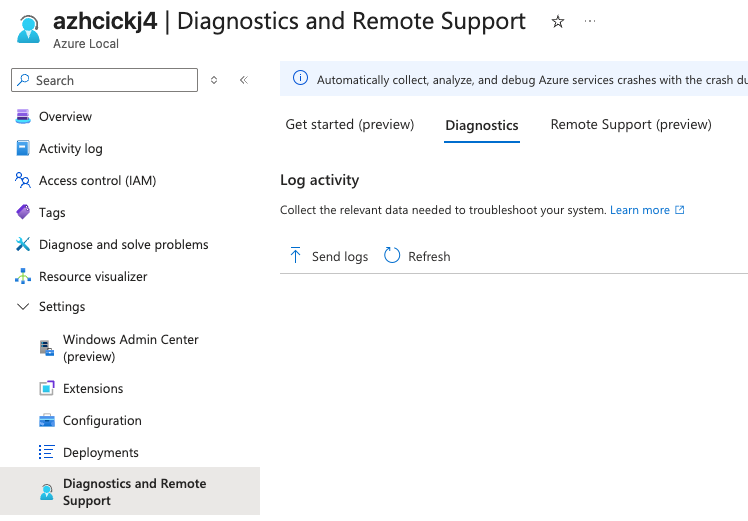
- Send logs is disabled under Settings > Diagnostics and Remote Support
- The portal shows a banner that the Device Management Extension is outdated and unsupported
- Log collection never starts, or I cannot see any meaningful status updates
That is frustrating when I am already in a troubleshooting situation, because log collection is often the next thing I need.
This is how it should look:
Root cause
In most cases I see one of these causes:
- The cluster is on a build earlier than
2510, which disables the feature - The
AzureEdgeTelemetryAndDiagnosticsextension is not installed - The system is not fully registered, or observability components are not healthy
- I do not have the
Azure Stack HCI Administratorrole
The important part is that this is usually a prerequisite issue, not a portal bug.
Solution
- Open the Azure portal and go to the Azure Local instance.
- Select Settings > Diagnostics and Remote Support.
- Check whether the portal shows that the Device Management Extension is outdated and unsupported.
- If the cluster is earlier than
2510, upgrade it first. The button will not come back until the system is on a supported build. - Confirm that the
AzureEdgeTelemetryAndDiagnosticsextension is installed. - Make sure I am signed in with the
Azure Stack HCI Administratorrole. - Try Send logs again.
If I want to collect logs through PowerShell instead, I use Send-DiagnosticData:
Send-DiagnosticData -FromDate (Get-Date).AddHours(-2) -ToDate (Get-Date)When I want to verify the history of submitted collections, I use:
Get-LogCollectionHistoryIf I need to save logs locally first, I can also write them to a share or a local path:
Send-DiagnosticData -SaveToPath C:\Temp\AzureLocalLogsRecommendation
I recommend testing log collection as part of the post-deployment checks, not only when something is already broken. That way I know the feature works before I actually need it.
HINT If the cluster build is too old, the fix is to upgrade the cluster. The portal will not override that prerequisite.
Final remark: when Send logs is disabled, I always start by checking build level and extension health before I spend time digging into the actual incident.
Have feedback on this post?
Send me a message and I'll get back to you.