Azure Local - Storage Design - Nested Resiliency
- Azure Local Storage and Nested Resiliency in Storage Spaces Direct
- Understanding Storage in Azure Local
- Nested Resiliency in Storage Spaces Direct
- Performance Impact of Nested Resiliency
- Storage Capacity Planning
- When Does Nested Resiliency Make Sense?
- Conclusion
Azure Local Storage and Nested Resiliency in Storage Spaces Direct
When working with Azure Local, storage is one of the most critical parts of the infrastructure. Azure Local relies on Storage Spaces Direct (S2D) to provide software-defined storage with high availability and performance.
One feature that often raises questions is Nested Resiliency. This capability is particularly relevant for small clusters, where traditional resiliency models may not provide sufficient protection.
This article does not provide a deep technical implementation guide. Instead, it collects some of the most useful resources I have found for understanding Azure Local storage and Nested Resiliency in Storage Spaces Direct.
The goal is to help readers quickly identify the best sources for further learning, and get faster to decision making, because the storage resiliency has to be determined before deploying the stack.
Understanding Storage in Azure Local
Before diving into Nested Resiliency, it is important to understand the fundamentals of storage in Azure Local. Two excellent articles provide a strong foundation.
Azure Local Technical Deep Dive
https://www.group-k.be/2025/07/microsoft-azure-local-technical-deep.html
This article provides a detailed explanation of the Azure Local storage architecture and explains how Storage Spaces Direct works behind the scenes.
Key topics covered include:
- How local disks are combined into a shared storage pool
- How data is replicated across cluster nodes
- The different resiliency models (mirror, parity, etc.)
- How cluster size affects redundancy and availability
If you want a solid understanding of how Azure Local storage works internally, this is an excellent starting point.
Azure Local Redundancy Explained
https://schmitt-nieto.com/blog/azure-local-redundancy/
This article focuses specifically on redundancy models in Azure Local.
It provides a clear explanation of:
- 2-way mirror vs 3-way mirror
- The concept of fault domains
- What happens during node or disk failures
If your goal is to understand how Azure Local protects your data, this article is highly recommended.
Nested Resiliency in Storage Spaces Direct
Nested Resiliency becomes particularly important in two-node deployments.
In a standard mirror configuration, the system is only protected against a single failure at a time. Nested Resiliency adds an additional layer of protection.
The official Microsoft documentation can be found here:
https://learn.microsoft.com/en-us/windows-server/storage/storage-spaces/nested-resiliency
The article explains the core concept of Nested Resiliency:
- Data is mirrored between nodes
- Data is also mirrored within each node
This means the system can handle multiple failure scenarios, for example:
- One node fails
- At the same time a disk fails in the remaining node
Microsoft describes two primary Nested Resiliency models:
Nested Mirror
- Mirror across nodes
- Mirror within each node
Nested Parity
- Parity across nodes
- Mirror within each node
The Microsoft Learn article is the best place to start if you want to understand how Nested Resiliency works conceptually.
Performance Impact of Nested Resiliency
Higher redundancy usually comes with some performance cost. An interesting performance analysis can be found here:
https://splitbrain.com/azure-stack-hci-mirror-vs-nested-volume-performance/
Although the article is somewhat older and written for Azure Stack HCI, the underlying technology is still Storage Spaces Direct, making the analysis highly relevant.
The article includes comparisons between:
- Standard mirror volumes
- Nested mirror volumes
It also measures:
- IOPS
- Latency
- Write performance
One of the key takeaways is that Nested Resiliency can introduce noticeable performance overhead, particularly for write operations, because data must be replicated multiple times.
Because of this, it is important to:
- Understand your workload
- Size the hardware appropriately
- Test performance before production deployment
Storage Capacity Planning
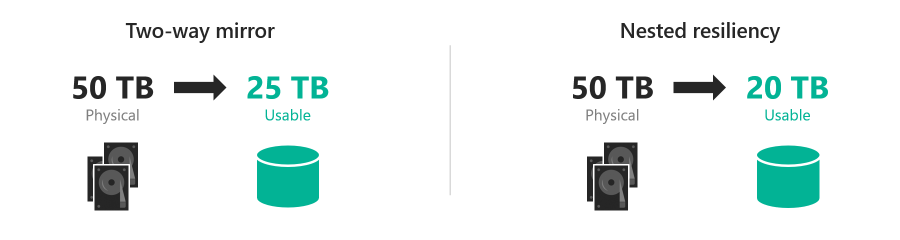
When designing an Azure Local solution, understanding capacity loss due to redundancy is essential. Fortunately, there are several tools that can help estimate usable capacity.
Azure Local S2D Capacity Calculator
https://azurelocalsd2.z5.web.core.windows.net/
This calculator provides a quick overview of:
- Raw capacity
- Usable capacity
- Impact of different resiliency configurations
It is especially useful during the design phase of a cluster.
Storage Spaces Direct Calculator
This tool allows more advanced simulations of different storage configurations.
You can experiment with:
- Cluster size
- Disk types
- Resiliency models
This makes it easier to visualize how different redundancy configurations affect usable storage capacity.
When Does Nested Resiliency Make Sense?
Nested Resiliency is particularly useful in environments such as:
- Two-node clusters
- Edge deployments
- Environments with limited hardware resources
In larger clusters (three nodes or more), traditional resiliency models are often more efficient.
Nested Resiliency should therefore be considered a specialized solution for small deployments where increased data protection is still required.
Conclusion
Azure Local storage is built on a powerful software-defined architecture with Storage Spaces Direct as the foundation.
Nested Resiliency extends the platform by providing additional protection in small clusters, but it comes with trade-offs such as:
- Reduced usable capacity
- Potential performance overhead
Because of this, it is important to understand both the architecture and the practical implications before choosing this approach.
The resources referenced in this article provide an excellent starting point for anyone who wants to gain a deeper understanding of Azure Local storage and Nested Resiliency.
Have feedback on this post?
Send me a message and I'll get back to you.
