
Azure Local - Azure Arc Gateway - Part 1 - What is it, and why use it?
- Intro
- Two components, not an appliance
- Why I would use it
- Gateway does not mean all traffic
- Public path versus gateway with private path
- Release considerations
- Outro
Intro
This article is part of a series: Navigate to series page
If you have deployed Azure Local behind a restrictive firewall, you know that outbound connectivity is not just a matter of allowing one Azure URL. Registration, extensions, updates, Azure Arc resource bridge, and workloads have different requirements.
Azure Arc Gateway helps us reduce the number of destinations we need to maintain in our firewall or proxy. In this article I will explain what it does, what it does not do, and how it fits into the Azure Local private path architecture.
Two components, not an appliance
Arc Gateway consists of an Azure resource and a local proxy component.
The gateway resource is a Microsoft.HybridCompute/gateways resource in Azure. It provides a gateway URL in the form <gateway-id>.gw.arc.azure.com. We use the URL returned by the resource; we do not construct it from the friendly resource name.
The local Arc proxy is part of the Azure Arc agentry. On an Azure Local machine, arcproxy runs as a service. The local HTTPS proxy endpoint is http://localhost:40343.
Note that the http:// prefix describes the connection to the forward proxy. It does not mean that the onward connection to Azure is unencrypted.
For supported HTTPS destinations, the simplified public-path flow is:
Azure Local component
  -> local Arc proxy
  -> enterprise proxy, if configured
  -> Azure Arc Gateway
  -> supported Microsoft service
Azure Arc resource bridge uses http://<cluster-IP>:40343 as its proxy first hop. That reaches the Arc proxy on the Azure Local machine serving the cluster IP. It does not use localhost inside the appliance to reach a host service.
Why I would use it
The main benefit is simpler outbound network management. We can allow the instance’s gateway URL for supported traffic rather than maintain a separate network rule for every supported service destination.
It also gives us a useful troubleshooting point. The local arcproxy.log helps us identify which destinations use the gateway tunnel and which use another path. Together with firewall logs, this makes connectivity issues easier to explain to the network team.
That is a reduction in complexity, not a replacement for firewall policy. We still decide which machines may connect, which non-gateway endpoints are permitted, and how workloads leave their own subnets.
Gateway does not mean all traffic
The number “seven endpoints” appears in Arc Gateway onboarding guidance. I would not use that as the complete Azure Local firewall specification.
Azure Local still has endpoints that are not redirected through Arc Gateway. These include bootstrap and registration dependencies, the deployment Key Vault, cloud witness storage where used, and HTTP certificate-validation endpoints. Extensions and applications can require additional destinations.
The important distinction is:
| Traffic | What happens |
|---|---|
| Supported HTTPS, with no bypass match | Uses the Arc Gateway tunnel |
| HTTPS to an unsupported destination | Uses the Arc proxy fallback path through the enterprise proxy or firewall |
| HTTP | Does not tunnel through Arc Gateway |
| Traffic matching a local bypass entry | Skips the configured local proxy path and follows the source network’s route |
Supported HTTPS matching gatewayBypass | Skips the gateway tunnel, but not a configured enterprise proxy |
Cloud-side gatewayBypass is not the same as a local proxy bypass list. It applies to exact supported endpoint FQDNs and affects all resources using that gateway. We will return to that distinction when handling Kubernetes.
HINT Seeing the Arc proxy service running does not prove that traffic uses Arc Gateway. Check the gateway URL, agent connection mode, endpoint tests, and logs.
Public path versus gateway with private path
The Azure Local private path is a network architecture, not a different type of Arc Gateway resource or a Private Link endpoint for the gateway.
With the public path, the local Arc proxy reaches the public gateway endpoint through our existing internet egress, optionally through an enterprise proxy.
With the documented private path, Azure Local reaches the private IP and explicit proxy port of Azure Firewall over ExpressRoute or a site-to-site VPN. Azure Firewall then forwards gateway traffic and handles permitted traffic outside the gateway tunnel.
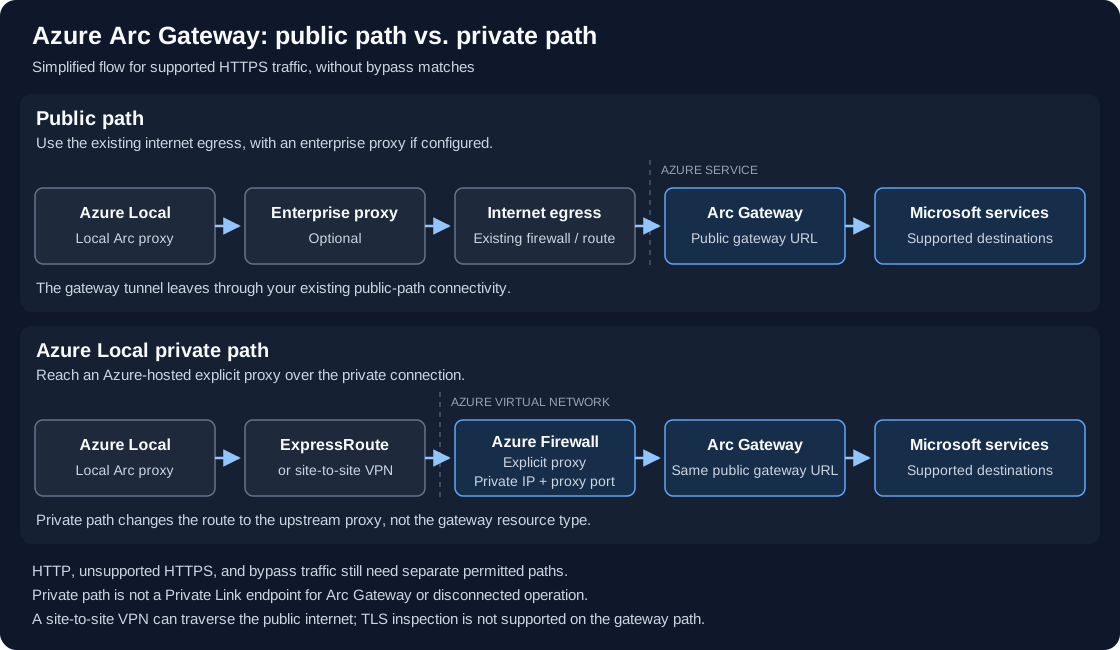
The diagram shows supported HTTPS without bypass matches. Both paths use the same public gateway endpoint; HTTP, unsupported destinations, and bypass traffic need their own permitted routes.
Azure Local / local Arc proxy
  -> ExpressRoute or site-to-site VPN
  -> Azure Firewall explicit proxy (private IP)
-> Azure Arc Gateway / other permitted service endpoints| Decision | Public path | Azure Local private path |
|---|---|---|
| On-premises outbound route | Existing internet egress | Private connection to an Azure virtual network |
| Upstream proxy | Optional enterprise proxy | Azure Firewall explicit proxy |
| Gateway endpoint | Public gateway URL | Still the public gateway URL, reached through Azure Firewall |
| Other dependencies | Permit required fallback and bypass paths | Permit them through the documented proxy or private-endpoint routes |
| Operational cost | Existing egress plus gateway-related requirements | Also Azure Firewall, private connectivity, routing, and DNS |
Private path does not make every Azure service a private endpoint. It also does not mean disconnected operation. A site-to-site VPN provides an encrypted tunnel that can run over the public internet; ExpressRoute provides private connectivity. The common feature is the controlled path from Azure Local to the private Azure Firewall proxy endpoint.
Microsoft documents Azure Firewall Standard or Premium for this architecture, with TLS inspection disabled for required Azure Local and gateway endpoints. Azure Arc Private Link Scope must not be enabled on the virtual network hosting that explicit proxy. Workloads needing that scope use a separate virtual network.
For implementation details, see the private path overview and private path deployment guide. Microsoft limits support to the documented architecture.
Release considerations
For new Azure Local deployments, Arc Gateway is supported from version 2506. Initial private path deployment requires version 2608 or later.
With version 2610, enabling Arc Gateway on an existing instance and moving an existing instance to private path are preview features. The post-deployment gateway preview cannot be disabled after enablement. Arc Gateway support for AKS on Azure Local remains in preview.
I would choose the desired topology before deployment whenever possible, rather than depend on a preview migration to correct the network later.
Outro
Arc Gateway simplifies supported Azure connectivity. Private path adds a controlled route to an Azure-hosted explicit proxy. Neither removes the need to understand HTTP, fallback destinations, bypass lists, or guest workload connectivity.
Next, I will explain what to prepare before deploying Azure Local. Part 2 is coming later; I will add its link to the series page when it is published.
Have feedback on this post?
Send me a message and I'll get back to you.