Azure Cost Management - FOCUS exports with deployment stacks and deny settings
- Intro
- Stack architecture: one stack or two?
- Why this happens
- Excluded principals vs excluded actions
- Excluded actions to use
- Deployment stack deny settings example
- Practical deployment flow
- Validation checklist
- Final remark
Intro
If you deploy Cost Management exports as Infrastructure-as-Code, there is an important detail to handle when deployment stacks use deny settings.
My scenario is:
- FOCUS cost exports are deployed per subscription.
- Export files are sent to one shared storage account.
- The storage account is deployed and managed by a deployment stack using deny mode
DenyWriteAndDelete.
That combination is good for control and governance, but you must explicitly allow the export identity to perform required storage operations.
HINT
I have chosen not to share the Bicep templates for this solution. The development work was done under strict regulations, and I have decided not to write a separate sanitized version at this time. I may publish a complete deployment example in a future post. In the meantime, you are more than welcome to reach out if you want inputs or guidance on your own implementation. This article is more about help to others in the process of deploying FOCUS that have encountered same issue as I did because of deployment stack usage.
Stack architecture: one stack or two?
When designing this setup, the first question is whether to use a single deployment stack or split it into two.
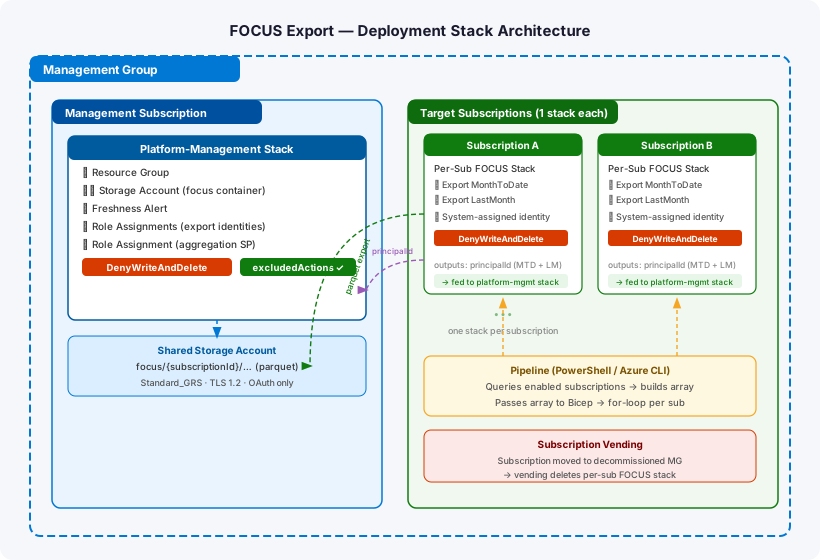
The storage account that receives FOCUS export files belongs in a central management subscription. The FOCUS export resource itself must be deployed into each target subscription individually — FOCUS exports are subscription-scoped (management group scope is EA-only). That means a single stack cannot serve both purposes cleanly.
A management group-scoped stack can deploy to the MG itself or to a child subscription, but it cannot fan out to multiple subscriptions in one operation. More importantly, the Microsoft docs on deployment stacks known issues confirm a hard limitation:
Deny-assignments aren’t supported at the management group scope. However, they’re supported in a management group stack when the deployment is pointed at the subscription scope.
There is also a subtler problem: a subscription-scoped deployment stack only manages resources within its own subscription. If you declare cross-subscription resources inside a stack, they are deployed but not tracked — meaning denySettings do not apply to them and actionOnUnmanage will not clean them up. That makes teardown and protection opt-in rather than automatic.
The right pattern is two stacks:
| Stack | Scope | Deployed to | Content |
|---|---|---|---|
| Platform-management stack | Subscription | Management subscription | Storage account, resource group, freshness alert, role assignments for export identities, aggregation service principal RBAC |
| Per-subscription FOCUS stack | Subscription | Each target subscription (one stack per subscription) | FOCUS export resources (MonthToDate + LastMonth) |
Both stacks run at subscription scope, both can use DenyWriteAndDelete, and they have no scope overlap. Onboarding a new subscription does not require touching the platform-management stack. Instead, logic outside of Bicep — for example a PowerShell script in your pipeline — queries the list of enabled subscriptions at deploy time and passes it as an array parameter. Bicep iterates that array with a for loop and reconciles one per-subscription stack per entry, so new subscriptions are picked up automatically on the next pipeline run without any template changes.
Cleanup is handled by the subscription vending process. When a subscription is moved to a decommissioned management group it falls out of the enabled subscription list, and the existing vending automation is expected to delete the per-subscription FOCUS stack as part of that offboarding. Our pipeline code does not need to handle removal explicitly.
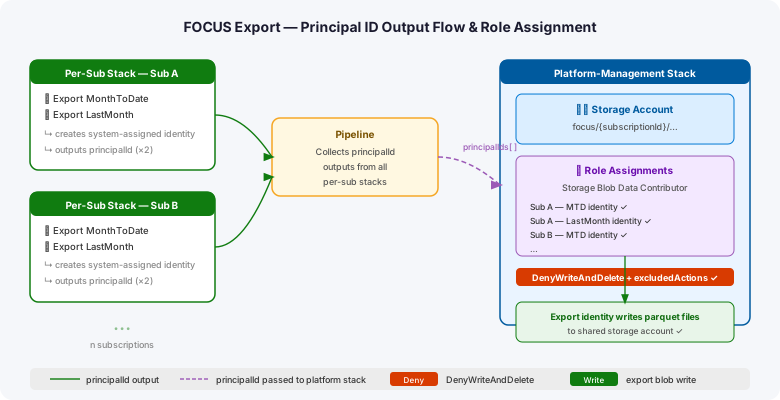
The per-subscription stacks expose the export managed identity principal IDs as outputs. The platform-management stack reads those outputs and creates the storage account role assignments — keeping all storage RBAC in one place, in the management subscription, under the platform-management stack’s deny protection.
HINT
Storage account role assignments for the export identities are deliberately kept in the platform-management stack rather than the per-subscription stack. The export’s system-assigned identity only exists after the export resource is created, and the storage account only exists in the management subscription. Keeping the role assignments in the platform stack avoids a cross-subscription dependency cycle and ensures the storage RBAC stays under the same deny settings as the storage account itself.
Why this happens
When you create or update an export, Azure creates a system-assigned managed identity for that export (one per subscription export deployment path).
That identity needs storage permissions to create and use the target blob container. With deployment stack deny settings enabled, those required management operations can be blocked unless you add exclusions.
Useful references:
- Create and manage Cost Management exports
- Deployment stacks and deny settings
- Azure built-in storage roles
- FOCUS specification
Excluded principals vs excluded actions
There are two ways to make this work when deny settings are enabled:
- Exclude principals: add the managed identity object IDs to deny exclusions.
- Exclude actions: allow only the required storage operations through
excludedActions.
Because the export identity is created per subscription, principal-based exclusions can become noisy at scale. In this article I use action-based exclusions.
Excluded actions to use
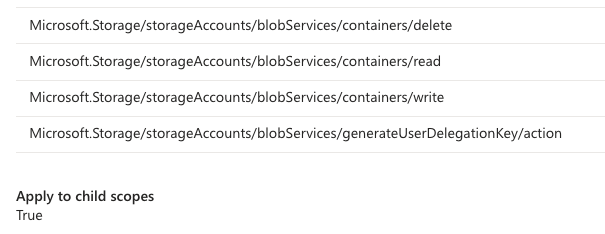
The following actions are required in this scenario:
[
  "Microsoft.Storage/storageAccounts/blobServices/containers/delete",
  "Microsoft.Storage/storageAccounts/blobServices/containers/read",
  "Microsoft.Storage/storageAccounts/blobServices/containers/write",
  "Microsoft.Storage/storageAccounts/blobServices/generateUserDelegationKey/action"
]
These map to operations used by the export identity role assignment (Storage Blob Data Contributor) during export delivery.
Deployment stack deny settings example
Below is a compact deny settings example showing DenyWriteAndDelete with action exclusions:
{
  "denySettings": {
    "mode": "DenyWriteAndDelete",
    "applyToChildScopes": true,
    "excludedActions": [
      "Microsoft.Storage/storageAccounts/blobServices/containers/delete",
      "Microsoft.Storage/storageAccounts/blobServices/containers/read",
      "Microsoft.Storage/storageAccounts/blobServices/containers/write",
      "Microsoft.Storage/storageAccounts/blobServices/generateUserDelegationKey/action"
    ]
  }
}
If you deploy stacks using CLI, the equivalent concept is --deny-settings-excluded-actions together with --deny-settings-mode denyWriteAndDelete.
Practical deployment flow
- Deploy shared storage account with deployment stack.
- Enable deny settings mode
DenyWriteAndDelete. - Add the storage actions above to
excludedActions. - Deploy per-subscription FOCUS export.
- Verify export run status and validate parquet files arrive in the target container.
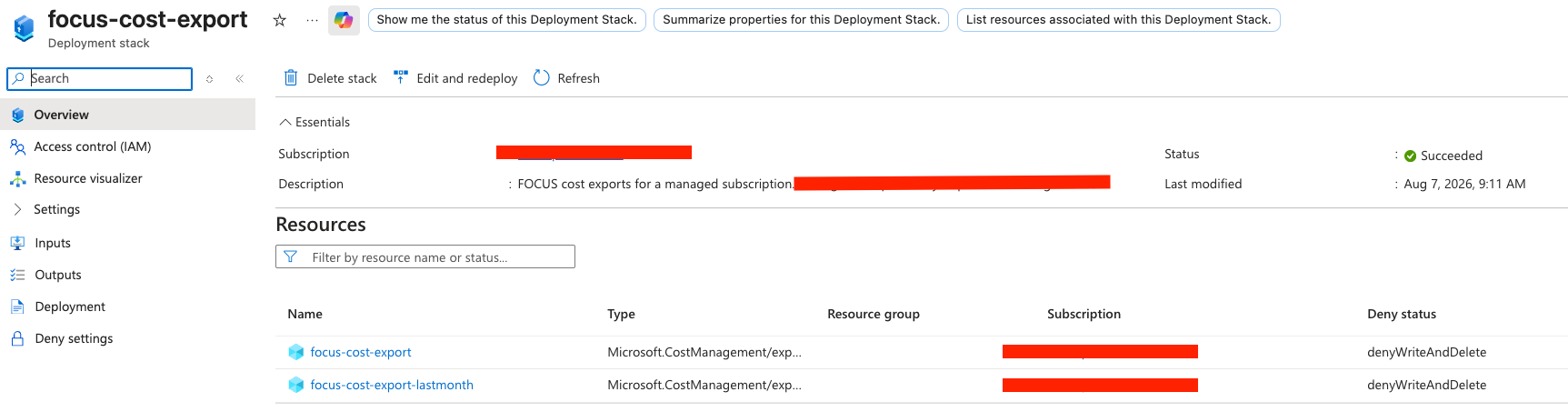
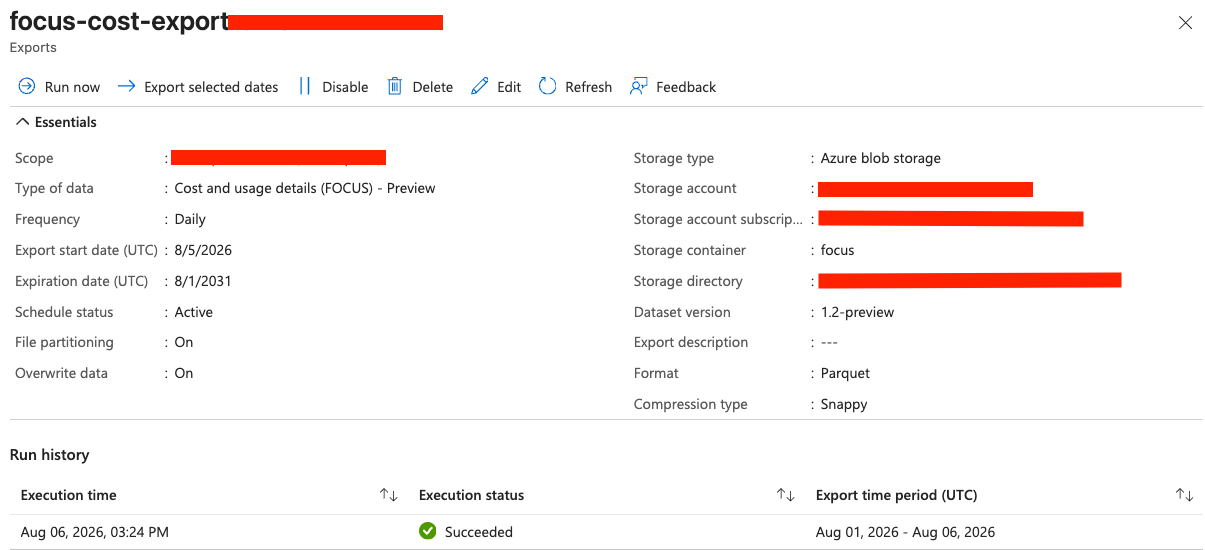
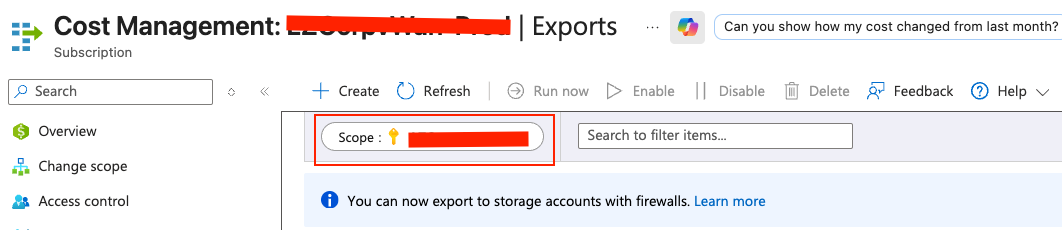
Note that cost exports are not visible if you have a management group selected as your scope in the portal. You must switch scope to the specific subscription you want to validate exports for.
Validation checklist
After deployment, validate:
- Export exists and runs successfully.
- Export managed identity role assignment is present.
- Parquet files are written to expected container path.
- No deny-setting conflicts are logged for required blob container operations.
Final remark
Using deployment stacks with deny settings and FOCUS exports is absolutely doable, but it must be explicit. If you want strong guardrails and predictable automation, action-based deny exclusions are a clean pattern for this scenario.
Have feedback on this post?
Send me a message and I'll get back to you.